
Screen Those Eyes!

Sometimes, it's those subtle post processing adjustments that can improve a photograph. Earlier in the week, I captured some photos of Zenda, an African lion at the Brookfield Zoo. I liked his pose and the soft, diffused light from the cloudy sky. Here is one of the images:
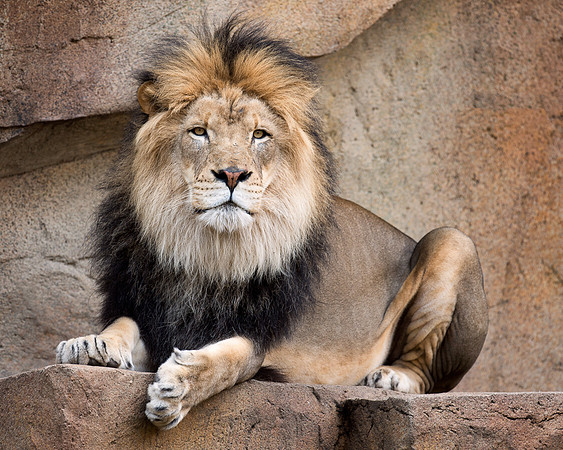 African lion
 While processing the image, I thought that the lion's eyes looked flat. Here's a closer look at his eyes:
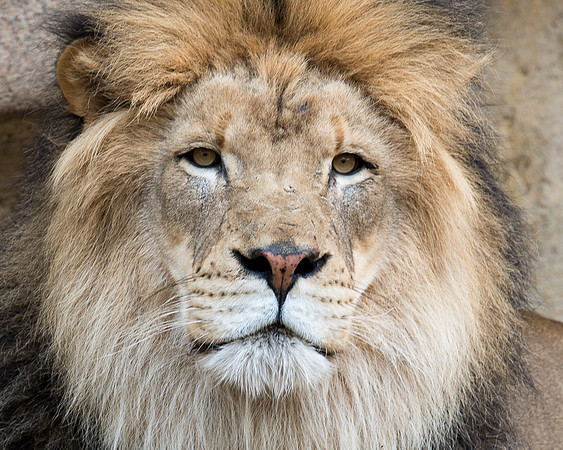 African lion
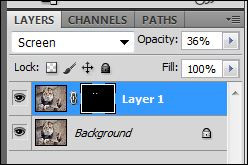
So, I brightened his eyes by applying a "screen" mask in Photoshop. First, I duplicated the layer. Then, I selected "screen" as the layer blend mode. Since I only wanted to brighten the eyes, I applied a layer mask in black (black conceals the mask). Then, I selected a white brush (white reveals) and removed the black mask just from the eyes. Finally, I reduced the opacity of the layer to 36% to make the adjustment more natural as the eyes looked fake and manipulated at 100%.
African lion
So, I brightened his eyes by applying a "screen" mask in Photoshop. First, I duplicated the layer. Then, I selected "screen" as the layer blend mode. Since I only wanted to brighten the eyes, I applied a layer mask in black (black conceals the mask). Then, I selected a white brush (white reveals) and removed the black mask just from the eyes. Finally, I reduced the opacity of the layer to 36% to make the adjustment more natural as the eyes looked fake and manipulated at 100%.
 Here's a close up of the eyes after screening:
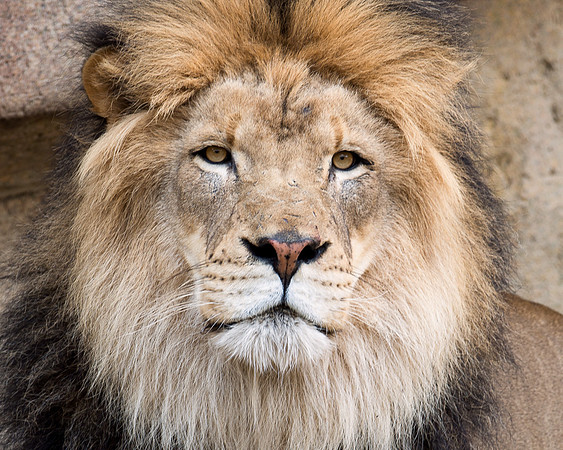 African lion
Again, the change is subtle. But, I think it improves the photograph.
African lion
Again, the change is subtle. But, I think it improves the photograph.
There are many methods of brightening eyes in Photoshop. As of late, I find the screening mask to be a quick and easy fix for most situations.