
D800 as a Tilt Shift Tool
When taking architectural photographs, I strive for straight lines. Getting the lines straight in camera is even more critical when dealing with an ultra-wide focal lengths (e.g., 14mm) or distracting distortion may result.
The cropping capabilities of the D800 allow me to achieve straight lines at the time of capture without necessarily having to purchase expensive tilt-shift lenses. Following is an example of how I applied this method while capturing an image of a historic farmhouse which was built in 1834 in Palos Park, a southwest suburb of Chicago.
This next scene is straight out of camera. For this image, my objective was to place the top of the tall trees within the frame while keeping the farmhouse straight. If I attempted to get the top of the trees into the frame by tilting the lens toward the sky, the farmhouse would no longer be straight--it would look it was falling backwards. Instead, I positioned the lens so that it was perfectly level to the horizon and then backed as far away as necessary to keep the trees within the frame.
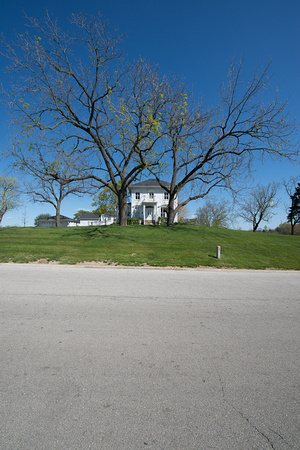
 Finally, here's the finished photograph after converting it to sepia using Nik Silver Efex Pro 2 software:
 Some may wonder why I don't correct any distortion during post processing. If the distortion is within certain limits, I often use the Perspective Crop tool within Photoshop CS5 to straighten lines. But, when the degree of distortion is more dramatic, using post processing tools to correct the distortion can severely damage image quality. It's best to not move pixels around very much during post processing if the goal is to preserve image quality.