
Trading Places

Every year, I break out the studio strobes and capture portraits of the baseball players who I coach. This year, one of the team's other coaches brought a chroma green screen to the photo shoot:
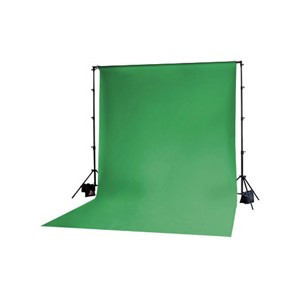
 By using this green screen as the background, it makes it much easier later during post processing to select the subject and replace the background. If we had used white or black seamless paper, as in past years, it is far more challenging to isolate the subject in Photoshop since the players all have shades of white or black throughout their uniforms, hair and skin. Fortunately, our team doesn't have green uniforms. And, none of our players have green skin!
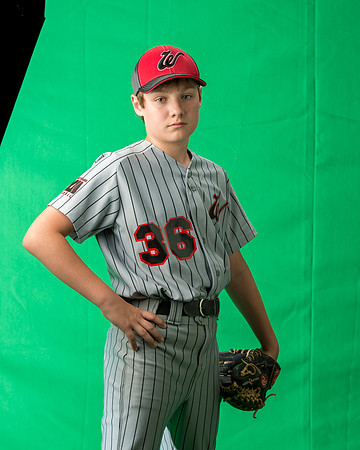 Ian Welgat (4x5)
It helps to keep the green screen smooth. Otherwise the selections become more complicated as shades of black enter the background in the creases of the screen. However, after a little practice, I was able to isolate the players from the background within a few seconds while using Photoshop.
Ian Welgat (4x5)
It helps to keep the green screen smooth. Otherwise the selections become more complicated as shades of black enter the background in the creases of the screen. However, after a little practice, I was able to isolate the players from the background within a few seconds while using Photoshop.
Once the player is selected, it is easy enough to move him to another background image. During this process, I applied a few different backgrounds. First, I applied a plain gray background:
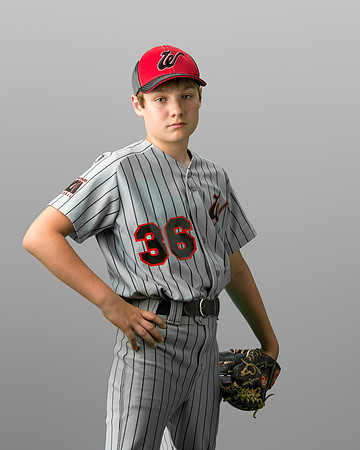 Ian Welgat (4x5)
Then, I applied an image of a blue, cloudy sky:
Ian Welgat (4x5)
Then, I applied an image of a blue, cloudy sky:
 Ian Welgat (4x5)
Finally, I used the following image that I captured a few years ago while visiting Tropicana Field in Florida:
Ian Welgat (4x5)
Finally, I used the following image that I captured a few years ago while visiting Tropicana Field in Florida:
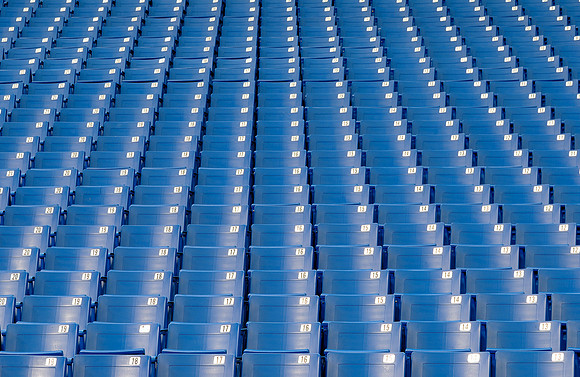 Stadium seats
I combined the photograph of the stadium seats with the picture of the player. Then, I converted the image to black and white (sepia tone) using Silver Efex Pro2 software to create the following composite photograph:
Stadium seats
I combined the photograph of the stadium seats with the picture of the player. Then, I converted the image to black and white (sepia tone) using Silver Efex Pro2 software to create the following composite photograph:
 Ian Welgat (2x3)
I am by no means an expert in creating composites, but this final image was the most popular picture from the day. Since then, other parents have been asking for composites. I've created some others using a tunnel at Wrigley Field as the background:
Ian Welgat (2x3)
I am by no means an expert in creating composites, but this final image was the most popular picture from the day. Since then, other parents have been asking for composites. I've created some others using a tunnel at Wrigley Field as the background:
 Connor Baker (2x3)