|
I'll be posting some random thoughts here about my photography: my travel plans, technical information behind some images, stories about how certain pictures were captured, etc. The timing of the postings will also be random as my priority is capturing new images rather than writing about existing ones. I hope you will feel free to comment on any of my postings and I appreciate you taking time to read my entries.

How Low Can You Go?For years, as a general rule of thumb, photographers have been taught to select a shutter speed that is no slower than 1 divided by the focal length of the lens. For example, when shooting with a 500mm lens, the shutter speed should be no slower than 1/500th of a second (1 divided by the 500mm focal length). Using a fast enough shutter speed helps minimize the risk of blur resulting from camera movement. The chances of camera movement blur becoming evident in the photograph increase as the lens offers more magnification (as in the case of telephoto lenses with higher focal lengths). On the other hand, photographers often strive to select a slower shutter speed for certain subjects. A slower shutter speed provides the photographer with an opportunity to lower the ISO setting--which in turn tends to maximize image quality. A slower shutter speed can also give the photographer more flexibility with the aperture setting--which in turn opens up more options for controlling the depth of field for sharpness with the frame. Yesterday, I tested some limits of how slow I could set the shutter speed while still creating tack sharp images. Keep in mind, if I simply held the camera and fired off frames, a shutter speed of 1/500th would be the guideline. This first image was captured at 1/80th of a second:
So, how can one create sharp photographs at such slow shutter speeds? I used the following approach:
Good luck out there! When 7 Exposures Isn't EnoughBefore taking photographs of the interior of the St. Mary of the Angels Church in Chicago, I asked the woman in the parish office if it would be possible to turn the lights on inside the church. Lighting the church really enhances the beauty of the interior of the building. In fact, an unlit church is hardly worth photographing. The woman agreed to light the church, but indicated that she would set the lights using a 15 minute timer. So, I was under time pressure to capture my photos! I decided to take as many of the larger scale images as I could while the lights were on and then concentrate on the closer subjects (e.g., stained glass windows, small sculptures) after the lights went off. Given the rush, I determined that bracketing seven exposures (at one stop apart) should provide enough dynamic range to capture details in both the highlights (particularly the stained glass windows) as well as the shadows. For added insurance, I dialed in a negative two stop exposure compensation before starting my sequence of shots. I also checked my histogram to ensure that the least exposed picture in the sequence didn't have any "blinkies" (blown highlights). Once I returned home and processed the images, I was disappointed that I didn't capture as much detail in the stained glass windows as I wanted. Given the extreme dynamic range in the scene, I should have gone with at least 9 exposures and dialed in more negative exposure compensation as well. Although there is some detail in the stained glass, it's not enough in my view:
Later that day, I visited the Bond Chapel on the campus of the University of Chicago. This time I wasn't rushed. And, this time I went with nine exposures in a scene with less dynamic range than the one at St. Mary of the Angels. The result is much richer detail in the stained glass windows with detail also retained in the brightly lit chandeliers:
Fortunately, I learned this lesson in Chicago (close to home) before traveling to San Antonio to photograph the Missions. All of my photographs of the Missions of San Antonio captured enough dynamic range for the viewer to see all of the colors and detail of the stained glass inside the churches. "Oriel Staircase" Wins Photo of the Day!This morning, my "Oriel Staircase" picture won Imaging Resource's "Photo of the Day".
This photograph was captured a couple of months ago in the Rookery Building on LaSalle Street in Chicago. Please click here for the "Story of the Staircase".
This marks the 15th time in the last 16 months that one of my photographs was recognized by Imaging Resource as its "Photo of the Day". Bandon Beach Photo Takes Third PlaceMy "Bandon Beach" photograph took third place in Imaging Resource's photo contest for the month of December:
My Sensor Cleaning Woes ContinueA couple of months ago, I posted a blog entry about how much easier cleaning my camera's sensor is with the sensor loupe. Well, I probably wrote those comments a little too soon! After receiving my sensor loupe, I was able to quickly locate the dust on my sensor. Using a sensor brush, most of the dust was easily lifted from the sensor. Any remaining particles were removed with a couple of swipes using the very expensive Visible Dust Sensor Clean swabs. My confidence began to rise as I successfully completed a second sensor cleaning before leaving for my Texas Road Trip in early January. While in Texas, I shot for 17 consecutive days...thousands of images...hundreds of lens changes in the field. I follow all of the tips about minimizing the risk of dust--changing lenses with the camera facing down, turning the camera off before removing the lens, etc. Yet, needless to say, my sensor was a mess by the end of this 17 day journey. When I returned home, I attempted to clean my sensor. As expected, the view through the sensor loupe revealed a lot of dust. I used the sensor brush to try to lift the particles. Many particles were removed, but a few remained. I decided to use a Sensor Clean swab. At $3 a pop, I hoped to to minimize the number of swabs. After the first try, a few dust particles stubbornly remained. I went back to the sensor brush. But, this time I accidentally touched the side of the chamber with the brush before it made contact with the sensor. The result was a sensor with something (oil?) smeared all over it! So, it was back to the Sensor Clean swabs. I used eight of those in total ($24) and still didn't have a clean sensor. I still had some of the much cheaper Copperhill Pec Pads (which only cost pennies each) left over from past cleanings, but for some reason I could not get the solution to stop smearing across the sensor. Before risking damage to my sensor, I decided to go back to APS to have my sensor cleaned. I drove up to the Morton Grove facility, paid $45, and waited while a technician cleaned my sensor. He was able to get my sensor clean and reported that there was no damage. He also informed me that both Nikon, and APS, advise that I don't touch the sensor again. He said that cameras come into the facility all the time with scratches on the sensor--and that a scratched sensor often means a trashed camera or very expensive repair. I mentioned that I shoot a lot--and that if I never cleaned my own sensor I would probably be visiting APS every month. At $45 a shot, and with a 70 mile round trip drive--that's not happening. So, my next experiment will be with a brand new cleaning tool. It's called the "Sensor Gel Stick". It looks easy enough to use and does not involve any cleaning fluids. If I struggle with the gel stick, I can always bring my camera back into APS! Dome PhotographyIn my quest to photograph the State Capitols, I've captured my share of domes! As time goes on, I'm learning more about the techniques of "Dome Photography". Here are some things I've learned while taking pictures of interior domes:
I probably have photographs of more than 100 domes so far. Here are just a few of them:
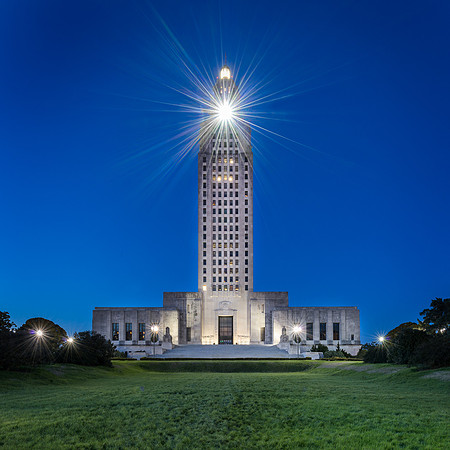
Go With the FlowCapturing photographs of the Louisiana State Capitol building was not an easy task. I had one evening in Baton Rouge to take pictures of the building's exterior. When I first arrived, the stairs in front of the Capitol's entrance were crowded with people. A group of about 40 elderly women were exercising by walking up and down the stairs. After about 20 minutes, they finally tired and I was able to take a few images. Later, I prepared for a night picture of the building. I prefer to capture the night images before the sky gets too dark. At twilight, the sky takes on that deep blue color which I prefer over the jet black sky. Just as the color in the sky was about where I wanted it to be, a spotlight at the top of the tower lit up. I couldn't believe that it was positioned directly at me (and my camera lens)! At first, I tried moving further away in hopes that maybe the light wouldn't appear to be as bright. That didn't work. My only remaining choice was to go with the flow. So, I selected a very narrow aperture (f/14)--a much higher f/stop than what's required for the depth of field in this image. This narrow f/stop promotes the scattering of the light. It helps create a star-like burst of light. Here is the resulting image:
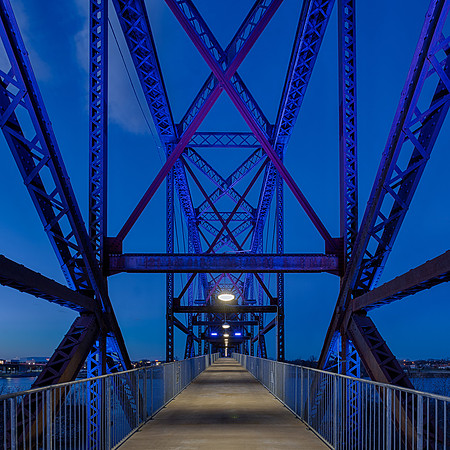
When Reality Looks FakeDuring my road trip to Texas last month, I visited the Clinton Presidential Library in Little Rock, Arkansas. Included in the complex is the Clinton Presidential Park Bridge. Before this bridge was converted into a pedestrian and cyclist bridge, it served as the Rock Island Bridge. The bridge crosses the Arkansas River. I arrived at twilight to photograph the bridge. My plan was to capture images of the bridge as it was illuminated under a dark sky. I started shooting early and continued making pictures until the bridge was fully lit:
So, I ended up using the photograph that I captured about ten minutes before this one. The bridge was just beginning to be lit and there is a bit more color in the horizon:
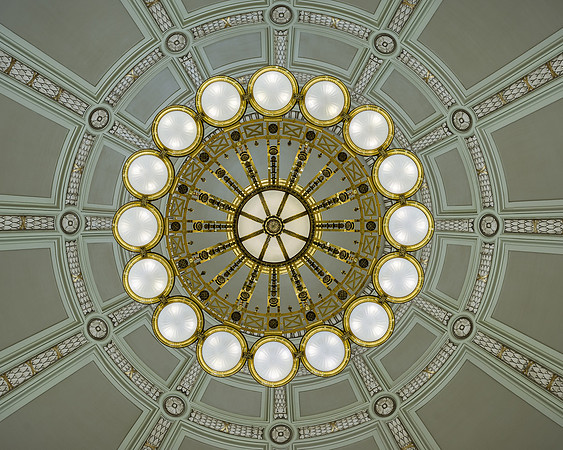
From 15 to 92 mmOne of the first things I do after entering a State Capitol building is to position myself in the center of the rotunda floor directly below the dome. If the camera is perfectly positioned under the center of the dome, everything in the frame will align within the circles. If the camera is off by just a couple of inches, the elements in the frame will not be aligned and the image does not look as appealing to my eye. While laying on the floor of the Arkansas State Capitol, I captured this photograph with my new Sigma 15mm fisheye lens:
I usually don't like removing a lens with the camera faced up since that increases the chances of getting dust on the sensor. But, since I was indoors and it was such an effort to get everything lined up, I left the camera on the tripod and carefully exchanged the Sigma 15mm fisheye for the Nikon 70-200mm lens. I zoomed to the 92mm focal length to frame the chandelier inside the dome. Here's that image:
Often times, I find it helpful to look at a scene through a variety of lenses. You never know for sure what you'll see. Keeping Everything SharpIn a scene such as this one, it can be challenging to keep everything in the frame in focus. Downtown Austin is far away. But, the statue of Stevie Ray Vaughan is just a few feet in front of my lens. My first approach is generally to dial in a smaller aperture (f/16 or smaller) to maximize the depth of field. In this case, even a narrow aperture isn't sufficient to keep everything tack sharp. Also, selecting very narrow apertures can introduce image quality issues due to diffraction. Lenses usually perform their best in the middle aperture ranges. For this photograph, I decided to go with one of the sharpest possible apertures on my lens--f/8. With the camera secured to a tripod, I carefully focused on the statue and triggered the shutter. Then, I shifted focus to the buildings across the river and took a second exposure. Later, in Photoshop, I blended the two images...selecting the sharp statue from one frame and the sharp background from the other frame. The composite image yields sharpness throughout at f/8! This is an effective trick that I really should utilize more often.
|