
Focus Stacking & More

During my last road trip, I used focus stacking for several images. Focus stacking involves taking multiple exposures to achieve a greater depth of field for tack sharp focus throughout the image.
The following image was captured at the Petrified Forest National Park in Arizona. The large petrified log is located very close to my lens. The logs in the background are quite distant. One approach to dealing with a situation like this is to select a very narrow aperture such a f/22. The downside of the narrow aperture is that images are typically not rendered as sharp at such an extreme f/stop. Also, the depth of field isn't great enough at f/22 to render the entire frame sharp in this case.
The other approach, which I used here, is to take one photo with the focus on the log in the front of the frame and another photo with the focus on the logs in the back of the frame. Then, the two (or more) exposures can be blended together in Photoshop to render the entire frame as tack sharp.
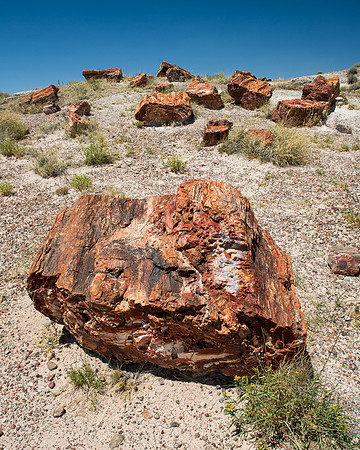 Petrified ForestGiant logs near the Rainbow Forest Museum at the south entrance of Petrified Forest National Park, Arizona on August 7, 2014. This photograph consists of two exposures focus stacked to provide maximum sharpness throughout the image.
I use the following method to accomplish this:
- Open up both images in Photoshop.
- Copy the entire frame of the image with the sharp foreground onto a new layer on top of the image with the focus on the background.
- With both layers selected, Auto-Align the layers (Edit >> Auto Align Layers >> Auto).
- Once the layers are aligned, add a black mask to the top layer (the one with the foreground in focus).
- With a white brush, paint over the black mask to reveal the foreground objects as sharp.
I used this approach many times to extend the area of focus while using an optimal aperture (f/8) for overall image quality. Here's another example of a focus stacked image with the rocks in the foreground situated just inches from my lens:
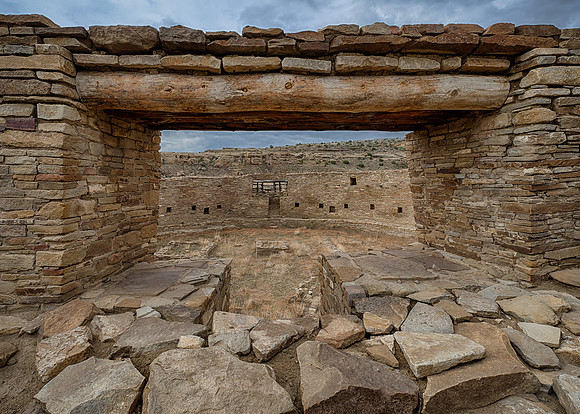 Great KivaChacoan Great Kiva at Casa Rinconada at the Chaco Culture National Historical Park in New Mexico on July 28, 2014
The above image of the Great Kiva at Casa Rinconada consisted of ten images. First, the focus was set on the rocks in the foreground and five exposures were captured to create a high dynamic range (HDR) picture. Then, the focus was set on the back wall of the kiva with another five exposures for a second HDR image. The two HDR images were then focus stacked. In the end, it took ten frames to render the entire image sharp as well as to extend the dynamic range to provide details in the shadows and highlights of the photograph!