
The Mirror Trick

Sometimes, I use what I refer to as the "Mirror Trick" to clean up a picture. This method came in handy after a recent visit to the Illinois State Capitol in Springfield.
The Grand Staircase is an interesting subject. The mural is 20 feet wide and four stories tall! I wanted to capture an image of the staircase and mural. However, as you can see from the original image (straight out of the camera) below, there were some unwanted objects within the frame on the staircase: posts on stands, a pile of rope, etc.
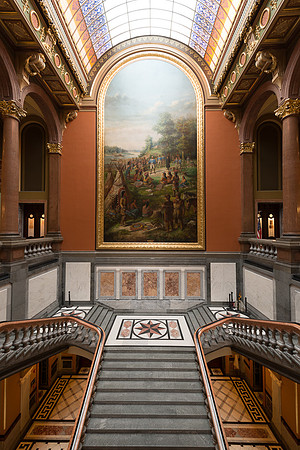 Illinois State CapitolA 40 by 20 feet painting over the Grand Staircase at the Capitol building in Springfield, Illinois on August 11, 2014. The painting depicts George Rogers Clark negotiating with the Native Americans at Fort Kaskaskia in 1778.
As always, the first thing I tried to address the clutter issue was to physically move the unwanted objects out of the frame. In this case, moving everything was going to take too much effort. The posts were heavy, the pile of rope was cumbersome and all of the items needed to be moved a good distance and then returned to their original place. So, I employed my "mirror trick" instead.
I bracketed a few more exposures so that more detail would appear in the highlights and shadows. Next, I used the following approach to remove the unwanted objects:
- Since the left side is cleaner than the right side of the frame, I started by cloning out the stand on the left side of the staircase. This was relatively easy to do.
- Once the left side was clean, I used the Rectangular Marquee Tool in Photoshop to make a selection which included an area surrounding the left post/stand. I then placed that selection on a new layer.
- Using that selection, I used the Free Transform function to "Flip Horizontal" that area. By flipping (or mirroring) the selection, it will fit much better on the other side of the frame.
- The next step is to Move the selection over the similar area on the right portion of the staircase. The flipped selection now appears on top of the messy original area on the staircase.
- Of course, the mirrored selection doesn't fit precisely in place over the messy section, so I once again use the Free Transform function--but this time Warp is the chosen tool. By slowly dragging a few of the anchor points within the selection, I was able to replace the original area with the selection with minimal effort. And, I can't really tell that the area has been manipulated even when the area is magnified.
Here's the completed image with everything cleaned up and put away:
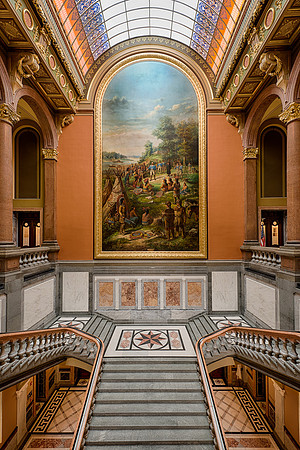 Illinois State CapitolA 40 by 20 feet painting over the Grand Staircase at the Capitol building in Springfield, Illinois on August 11, 2014. The painting depicts George Rogers Clark negotiating with the Native Americans at Fort Kaskaskia in 1778. This photograph consists of three exposures blended together to create a high dynamic range (HDR) image.