|
I'll be posting some random thoughts here about my photography: my travel plans, technical information behind some images, stories about how certain pictures were captured, etc. The timing of the postings will also be random as my priority is capturing new images rather than writing about existing ones. I hope you will feel free to comment on any of my postings and I appreciate you taking time to read my entries.

Dog in Flight Photo Wins Contest!On November 5, 2012, my "Dog in Flight" photograph won Image Resource's Photo of the Day. It then placed first for the month of November out of the 30 daily winning entries. As a result, Image Resouce is sending me a new professional photo printer--the Canon PIXMA Pro 9000!
Third Time's a Charm!In November, Imaging Resource selected my "Dog in Flight" picture as its Photo of the Day for 11-5-2012. Then in December, my "Orangutan Pose" photograph was the Photo of the Day for 12-3-2012. Today, a third image, "A Helping Hand", was selected as the Photo of the Day (1-8-13)!
At the end of each month, three of the daily winners from the month will be awarded Canon photo printers. So, I have about a 10% chance of landing another brand new printer. Imaging Resources has already shipped one new professional photo printer (the Canon PIXMA Pro 9000) for the November 5, 2012 photo. Turn on the Light with Photoshop!Often times, it's the little touches that make a photograph work. During my recent trip to New Mexico, I noticed the Inn and Spa at Loretto in downtown Santa Fe. Although the building was an interesting subject for photography during the day, my vision was to capture it at dusk. My hope was that at dusk the luminaria (i.e. lights) would be lit and that the sky would be a more interesting color. Given my limited time in the city, my best chance for this kind of lighting was just before sunrise. I braved the freezing temperature and arrived at the Inn about 30 minutes prior to sunrise. Fortunately, the lights were on! Here's the image that I captured:
Once the exposure was corrected, I then moved onto dealing with the faulty lights. Note that two of the bags are not fully lit (circled in red). Using Photoshop CS5, I eliminated the upper bag as I didn't like how close it was positioned to the bag above it. Then, I lit the lower bag by cloning one of the other bags in the frame over it.
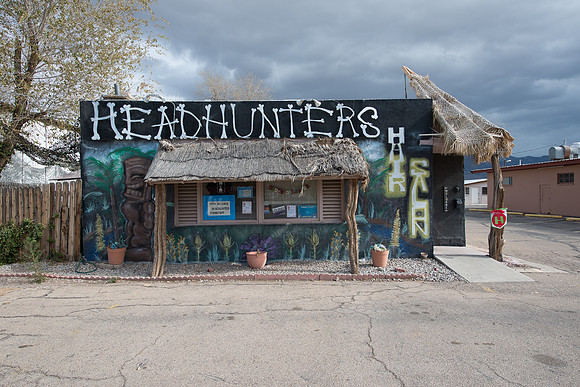
Sometimes, using Photoshop to turn on a light can improve a photograph! Move Around for Different PerspectivesOften times, I find it helpful to move either closer or further from a subject in order to view it in a different perspective relative to the background. I started shooting the Headhunters Hair Salon in Alamogordo, New Mexico from the parking lot directly in front of the store using a 22mm focal length. Note how getting very close to the building eliminates the mountains behind the store from the frame.
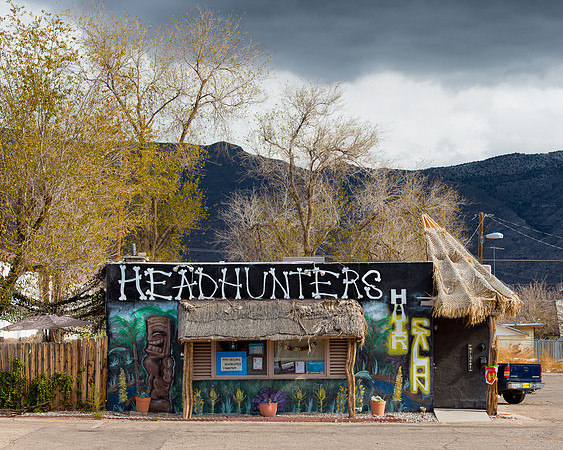
Sometimes, my goal is to remove unwanted objects from the background. However, in this case, I wanted to show the setting of the store and to include the mountains in the background. To accomplish this, I moved further from the building. I captured the next photo from across the street and changed the lens on my camera from the 14-24 to the 70-200. This next image is captured at an 82mm focal length. Note how the mountains are now prominently displayed in the frame. The longer focal length also helps compress the elements in the scene.
Correcting White BalanceEven the most current camera sensors are challenged to portray accurate colors given the variety of artificial lighting sources present in many building interiors. An example of this situation occurred just a couple of days ago while I was shooting a photograph of a piece of artwork hanging in the Oklahoma State Capitol building. At first, I gave the Auto White Balance setting on my Nikon D800 a chance. Here was the result:
Remembering Another TragedyI just returned from my trip to New Mexico. Now, it's time for the overwhelming task of processing the images!
I thought I would start slow by processing the images captured during the last hours of my journey. On my drive home to Chicago, I stopped for a few hours in Oklahoma City where I visited the State Capitol Building and the Oklahoma City National Memorial.
Here are some from the Oklahoma City National Memorial. As many of you will remember, this bombing took place 17 years ago (in 1995). 168 people and two unborn babies were killed. This was my first visit to the monument and I was stunned at the size of it. It's the size of a city park and quite impressive. Anyway, here are a few of the images.
Unfortunately, the skies were bright overcast with drizzle.
Gates of Time...one of two massive monuments that mark the formal entrance to the monument:
 
Field of Empty Chairs across the reflecting pool:

Field of Empty Chairs. There are 168 chairs--one for each person killed in the bombing. The small chairs are used to represent the 16 children killed. There are nine rows of chairs...one for each floor of the building.

As Jesus Wept...across the street at St. Joseph's Old Cathedral, a parish building was also destroyed in the blast. Rather than rebuild it, the church constructed this monument of a statue of Jesus weeping with his head in his hands. He is faced away from the site of the bombing (you can see the cyclone fence used to secure the site originally in the background). Jesus is facing towards 168 small openings in the brick wall--one opening for each person killed. At times, candles are placed in these openings in the wall.

Children's Wall...children from around the world sent ceramic tiles to Oklahoma City after the bombing. Many of these tiles are displayed at the site.


Following are some individual tiles which I found to be interesting:





So, I've processed the images from the last two hours of my 21 day trip! This is going to take a very, very, very long time!
The Case for HDRI use multiple exposures to create high dynamic range (HDR) images quite frequently. When photographing scenes with challenging exposures, this allows me to retain some details in both the highlights and shadows. Many years ago, I captured a photograph of the Chapel of the Transfiguration in Grand Teton National Park using Kodachrome slide film. Slide film does not offer a great deal of dynamic range, so I had to choose an exposure that would retain details in the highlights (the mountains and sky) or the shadows (the interior of the church). I chose the highlights, so the interior of the chapel went dark.
I then blend the five exposures using Nik's HDR Efex Pro2 software. Once I have a single blended image, I run the photo through my normal post processing steps in Lightroom 4 and Photoshop CS5. Here is the finished image:
An example of this was a recent photograph I captured of the Notre Dame hockey arena. After adjustments in Lightroom, the single exposure was able to retain details in the highlights and shadows. But, the HDR image retained far higher image quality throughout the photograph--particularly in the dark ceiling.
Although the dynamic range of the sensor in the Nikon D800 is amazing, I still find myself using HDR techniques under more challenging lighting conditions. Iconic ImagesWhile planning for my trip to Yellowstone and Grand Teton National Parks, it quickly became evident that there are several iconic images in those parks. And, the scenes are iconic for good reason--the scenery is spectacular. While sitting in one of the lodges, a photographer was advising me exactly how each of these iconic images should be captured. First, he explained how the landscape at Schwabacher's Landing must be composed. He quantified the distance that I needed to hike down the trail--and pointed out that I would know exactly where to stand as there are three holes worn in the ground near the water where the tripod legs are to be placed! He then described precisely how the Moulton barn should be framed. All of this advise got me thinking about how challenging it is to capture these unique scenes in a way that is different. I wasn't thrilled with the idea of reproducing the same images that were already on display on postcards in all of the stores. Yet, I realized that portraying these scenes in a unique way would be challenging, if not impossible. And, that it would still be fun to photograph some of these amazing sites with my own camera. I realize that my photograph of the John Moulton barn is much like many others. I decided to bring some foreground (sagebrush) into the frame and widen the focal length to add some additional environmental perspective. Although I wasn't particularly pleased at the time, I now think that the early morning rain and the more dramatic sky added significantly to this photograph.
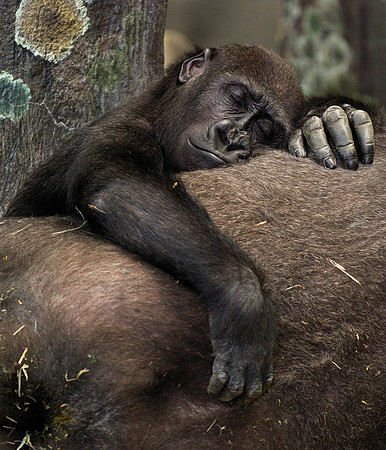
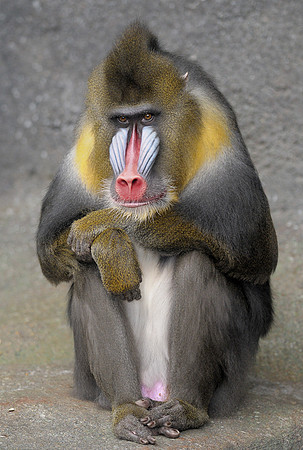
Tropic WorldI visit the Brookfield Zoo quite often to practice my photography. Many of the exhibits use moats to separate the animals from the visitors. This eliminates any obstructions (e.g. glass, wires, cages) which would make creating pictures more difficult. Also, there are several indoor exhibits. This makes the zoo an ideal place for photography even when the weather isn't cooperating. Tropic World is one of my favorite indoor exhibits. Tropic World is a massive indoor exhibit space that houses a variety of primates. The exhibit is in part lit by a glass ceiling--which provides soft, diffused daylight that is ideal for photography! An Afternoon Nap
Consecutive Winning Months!Last month, Imaging Resource selected my "Dog in Flight" picture as its Photo of the Day for 11-5-2012. This month, another one of my photographs was selected. My "Orangutan Pose" photograph is the Photo of the Day for 12-3-2012!
At the end of December, three of the 31 daily winners from the month will be awarded Canon photo printers. So, I have about a 10% chance of landing a brand new printer. |