|
I'll be posting some random thoughts here about my photography: my travel plans, technical information behind some images, stories about how certain pictures were captured, etc. The timing of the postings will also be random as my priority is capturing new images rather than writing about existing ones. I hope you will feel free to comment on any of my postings and I appreciate you taking time to read my entries.

"Mission Staircase" Wins Photo of the Day!This morning, my "Mission Staircase" picture won Imaging Resource's "Photo of the Day". CLICK HERE to view Imaging Resource's Photo of the Day page. This image was captured during my last road trip at the historic Mission Inn in Riverside, California. Although the Mission Inn isn't one of the 21 California Missions, it's an interesting architectural site of its own right. Fortunately, I stayed overnight at the Mission Inn and was able to gain access to this staircase. I was walking around and exploring different areas within the Inn when I came across this scene. This is the third picture from my last road trip to win a photo contest.
This marks the 35th time that one of my photographs was recognized by Imaging Resource as its "Photo of the Day". Click here to view all of the winning entries over the past few years.
It Happened!As a lifelong Cubs' fan, I still can't believe that our suffering finally ended last night. When I was 8 years old, my dad took me to Wrigley Field for my first baseball game. A few days ago and 48 years later, I was fortunate to go with my dad (and my brother and nephew) to see the Cubs win Game #5 of the World Series at Wrigley Field.
From a photography perspective, I captured my very first picture at that game back in 1968. My uncle gave me a camera loaded with some black and white film--and my first exposure was a picture of Wrigley Field from the first row of the upper deck.
Southern Cities Road TripI have a couple of open weeks in November, so I decided to squeeze in another photography trip. This trip will include three southern cities (Louisville, Chattanooga and Savannah) as well as the Jimmy Carter National Historic Site in Plains, Georgia. This trip will cover just over 2,000 miles in 12 days. Here's my preliminary itinerary:
Following are some potential photography subjects and/or activities: Louisville
Chattanooga
Savannah
When Privacy Turns to ParanoiaAs I've stated in past blog entries, a tripod is an essential tool for my photography. A tripod helps me in the following ways:
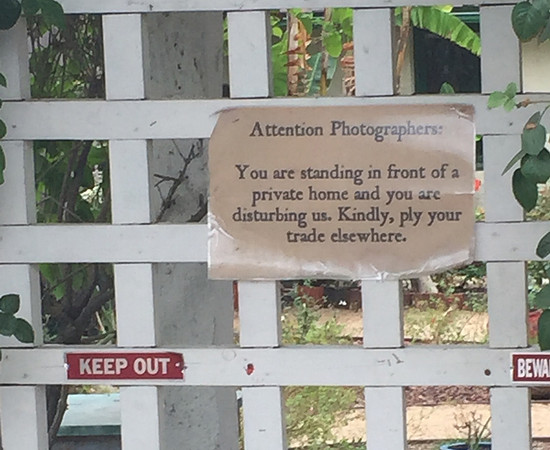
The tripod is so important to my photography that I won't bother shooting certain interiors when a tripod is prohibited. The problem is that tripod restrictions are becoming stricter each year. Over the past year, I've been told that photography with a tripod is banned not only in certain interiors, but also when photographing exteriors. Last year, I was informed that tripods were prohibited anywhere on the Harvard campus! During my last photography road trip to the Missions of California, I was prohibited from using my tripod in some unexpected places. While taking pictures of the Disney Concert Hall in downtown Los Angeles, I was told to put my tripod away when I was caught taking pictures of the building from the sidewalk. In Las Vegas, I was told to stop shooting the City Center buildings as I was taking pictures from a walkway across Las Vegas Boulevard! Of course, the restrictions are for worse when shooting interiors. My approach is to have everything ready to go. I set up quickly and grab a few shots before security approaches me. But, this game I play with security takes quite a bit of the fun out of photography. Just when I thought that photography restrictions couldn't get any worse, I came across this sign in San Juan Capistrano, California. This home faces a public road. Under the current laws of the United States, photographers can still take pictures while standing on public property. Yet, this homeowner placed this sign on the front gate of his property! Apparently, photographers must stage photo shoots there. But, I have no idea why. The home didn't attract my eye at all and wasn't particularly well maintained.
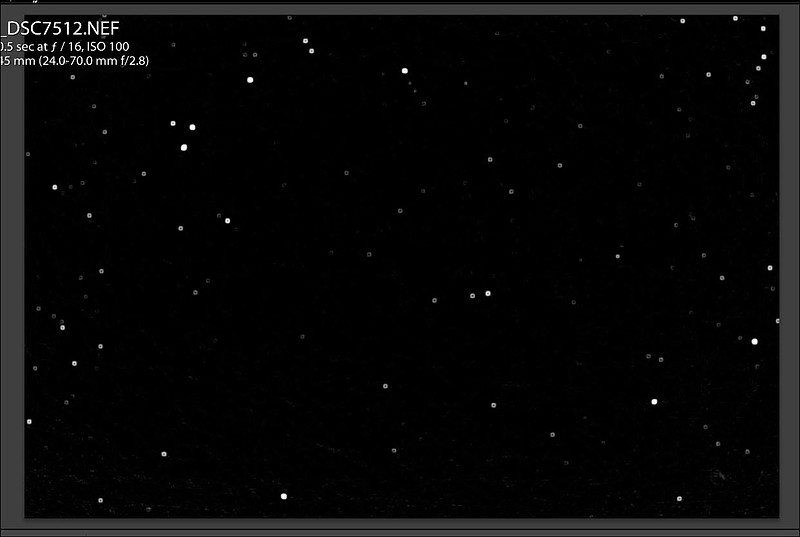
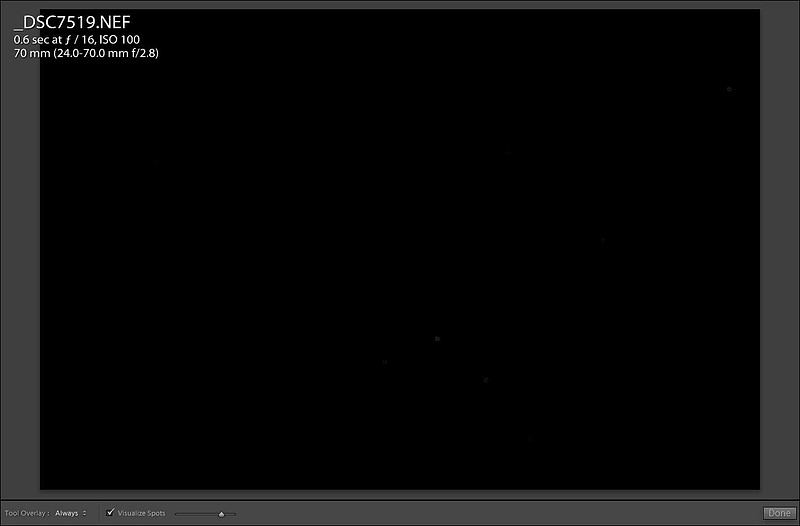
Sensor Gel Part IIIAfter probably more than 1,000 lens changes in the field during my long photography road trip, I noticed that sensor spots were becoming an issue during my post processing. I've more or less given up on attempting to wet clean my own sensor. Instead, I've used the Sensor Gel stick over the past couple of years to clean the sensor on my Nikon D800. To read my first impression of this product, please CLICK HERE. To view my blog entry about my experiences with this product after the first six months, please CLICK HERE. Here's how my sensor looked after returning from the trip:
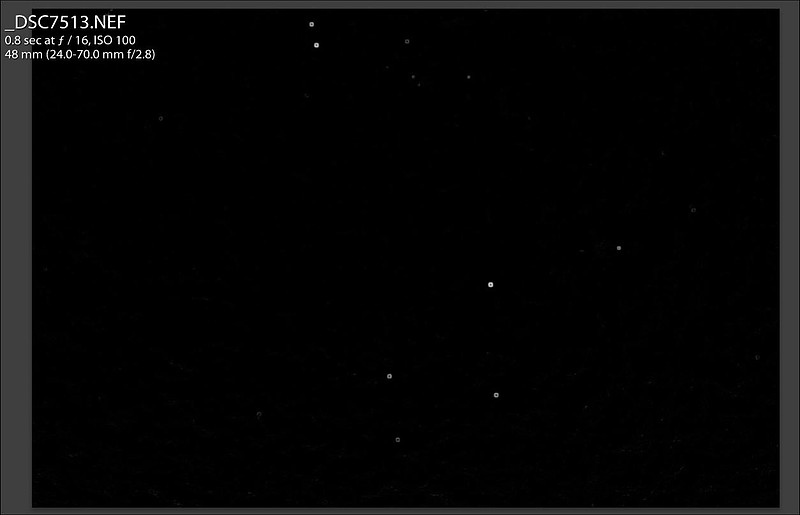
It looks like a complete mess. In reality, it's not nearly as bad as it appears. More spots are visible at small apertures. So, when cleaning the sensor, I shoot at f/16 against a uniform, white background (my computer monitor). If I were to shoot at a wider aperture, which I almost always do in the field, not nearly as many spots are visible. Also, within Lightroom's "Visualize Spots" feature, the slider can be moved from left to right to adjust the tolerance of the view. In the shot above, the slider was set to the most extreme setting--making everything visible. In an attempt to clean the sensor, the first thing that I did was to activate the automatic sensor cleaning option on the Nikon D800. That usually helps, but doesn't always take care of all the dust. The next thing I tried was to blow the particles from the sensor using a rocket air blower. Finally, I took a minute to apply the Sensor Gel stick to the sensor. Here's the result:
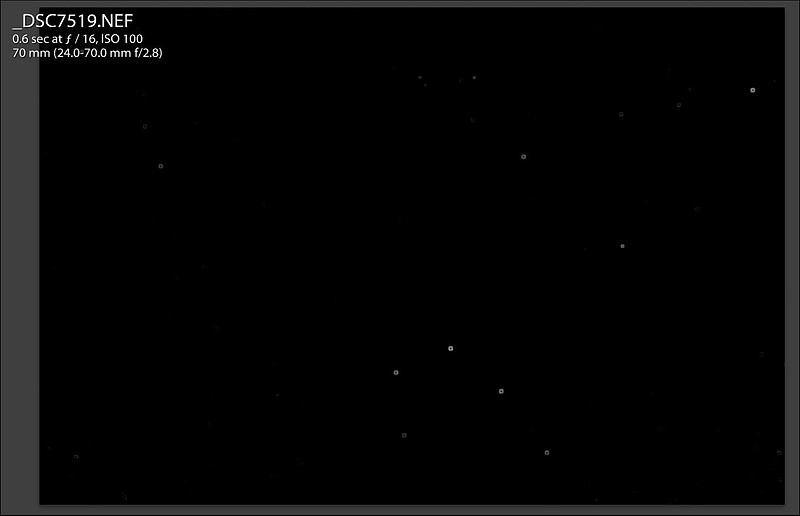
That's much better! But, those few spots remaining spots still bothered me, so I tried again:
So, I lowered the tolerance setting on the sensor spot view in Lightroom to a more reasonable level. I think the sensor is clean enough for me for the time being. Thankfully, there's no need for me to take the camera into APS to have the sensor wet cleaned.
Note that the "Visualize Spots" box is checked (bottom of picture) and that the slider was moved slightly left from the right edge of the range. This feature appears in the Develop Module when using the Spot Removal Tool. While it won't clean everything that might stick to a sensor, the Sensor Gel stick is easy to use and has done the job for several sensor cleanings for me. It's not cheap, but certainly a lot less expensive than taking the camera in to have the sensor cleaned. The breakeven point is under two cleanings. "A Look Through My Lens" Published for 2016!The highlight of the year from a photography perspective was my 32 day road trip from Chicago to California and back. The primary purpose of the trip was to visit the 21 Missions of California. But, I saw many other interesting locations along the way. Unlike my past books which compiled my favorite photographs from the entire year, this book features images from just this one trip. You may CLICK HERE to view a full preview of this year's book. It's most effective to view the images with pages of the book expanded to fill your monitor. I also recommend selecting the Dust Jacket version of the preview (positioned under the book). I use Blurb to create my books. I'm very pleased with the quality of the product--from the binding and paper to the image quality. Producing such a small quantity of books makes the per unit cost very high. I make these available for purchase at the base cost from Blurb. Often times, promo codes are available through a Google search to lower the cost by 15 to 25%. I used the promo code FAM40 (available through October 18th) for a 40% discount! This is the ninth annual "A Look Through My Lens" book that I've created. I'm tempted to create books that cover subjects such as the State Capitols, Places of Worship and the California Missions in the future. "Des Moines Bridge" Wins Photo of the Day!This morning, my "Des Moines Bridge" picture won Imaging Resource's "Photo of the Day". CLICK HERE to view Imaging Resource's Photo of the Day page. This image was captured along the Des Moines River during my recent road trip from Chicago to California and back. I stayed in a hotel in downtown Des Moines and had easy walking access to this bridge and other interesting sites.
This marks the 34th time that one of my photographs was recognized by Imaging Resource as its "Photo of the Day". Click here to view all of the winning entries over the past three years.
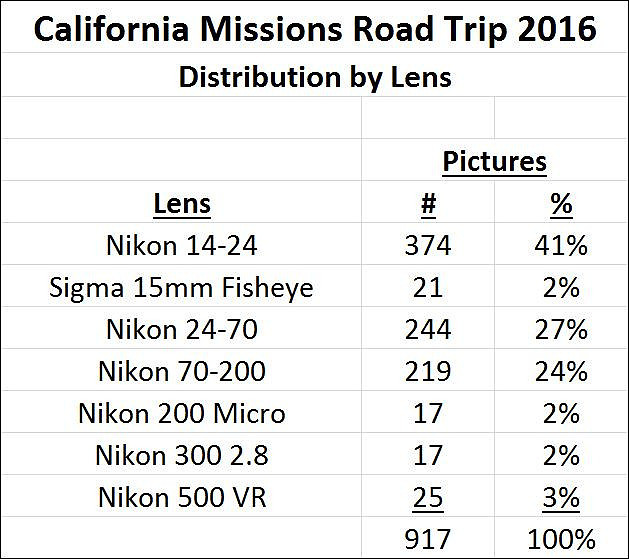
What Lenses Did You Use?Nearly every time I return from a trip, I'm asked about which lenses I used to capture the images. At the end of a long trip, I like to look at the distribution of shots by lens. Here's how it looked for my most recent road trip to photograph the 21 Missions of California:
I used just one camera for the entire trip--the Nikon D800. Given the number of architectural images that I captured, it's not surprising that the ultra-wide Nikon 14-24 was the workhorse once again. My Nikon 24-70 saw far more use than it usually does. The fisheye, micro and longer prime lenses served as specialty lenses for this particular journey. One might question why I bothered to carry a lens that only contributes 2 to 3% of my total pictures for the trip. In this case, they were used to capture images that my other lenses aren't capable of capturing. Here are a few examples: Sigma 15mm Fisheye No other lens of mine is capable of including this entire circle within the frame.
Nikon 200 Micro I don't have any other lenses that can focus at such a close distance.
Nikon 300 2.8 VR1 I don't have a lens that's any sharper than this one.
Nikon 500 VR I brought this rather cumbersome lens along just in case I came across any California surfers. I'm glad I had it with me.
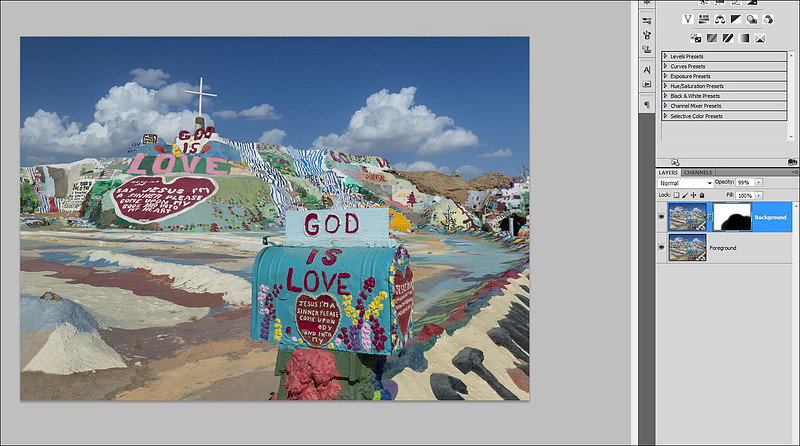
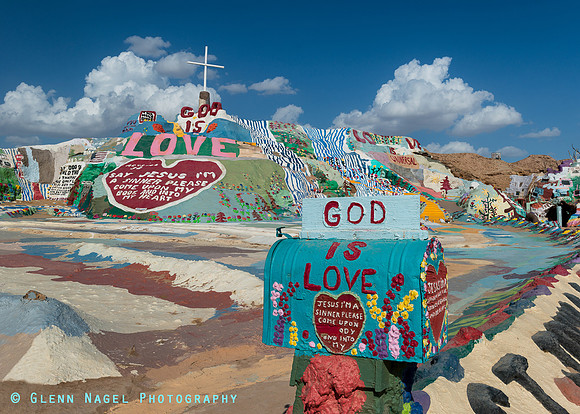
Blending for a Tack Sharp ImageDuring my last road trip, I captured thousands of images. The majority of those pictures involved taking more than one exposure and blending them in Photoshop to solve some challenge--greater dynamic range of light, greater depth of field of focus, selective polarization, erasing tourists, etc. One of the most interesting sites that I came across during my trip was Salvation Mountain. Salvation Mountain is a very colorful place near Niland, California. It's basically in the middle of nowhere! For this photograph, I selected a wide angle focal length (29mm) and positioned the lens very close to the mailbox. Since the mailbox is so close (maybe a foot away) and the mountain so far from the lens, it's not possible to have render both of those things as tack sharp with one exposure. The solution is take take two or more exposures. First, I took an exposure with the lens focused on the print on the mailbox. Then, I took a second exposure with the lens focused on the print on the mountain. In Photoshop, I opened both images and stacked the file with the background in focus on top of the picture with the mailbox in focus. Once the pictures are layered, I made sure to align them. With both layers selected, go to Edit >> Auto Align Layers >> Auto. I applied a mask to the top layer--the one with the background in focus. Within the mask, I painted with black over the mailbox and surrounding foreground. Remember that white reveals and black conceals. So, by painting with black, I concealed the background focus--leaving the bottom layer to render the mailbox in focus. The end result is that the entire frame is in sharp focus.
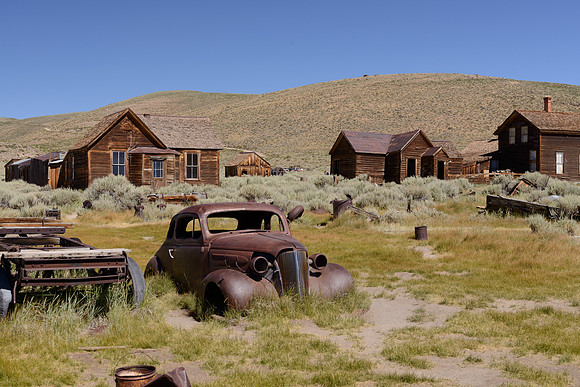
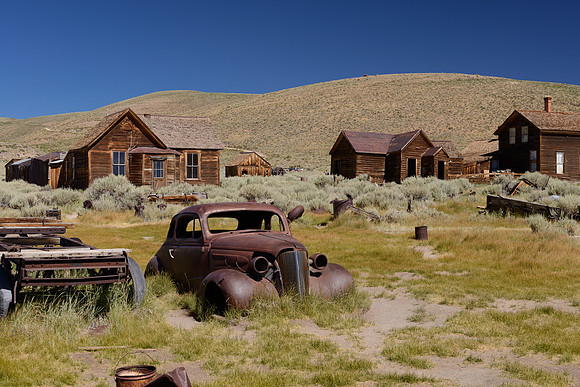
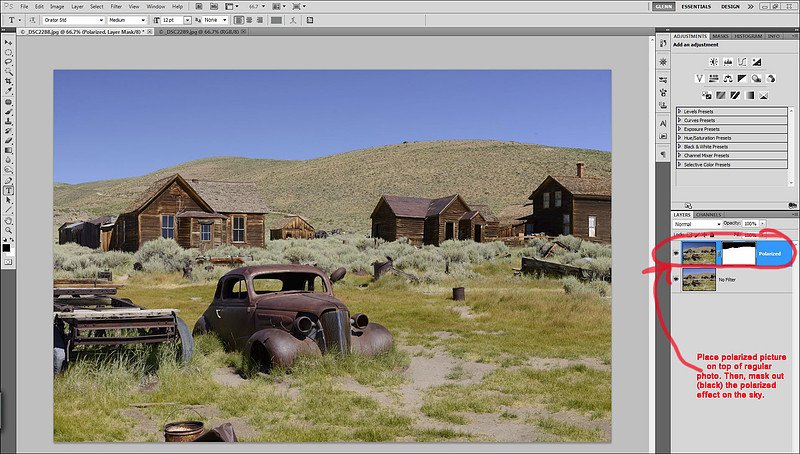
Selective Polarization!Many years ago, when I was shooting Kodachrome slide film, I got into the habit of underexposing my pictures a bit to bring out the colors. I also used a polarizing filter quite often to enhance color. However, this approach usually led to an unrealistic sky. The sky would sometimes turn such a dark blue that it almost looked like a night sky. In the digital age, this wasn't so problematic. Whenever shooting a clear blue sky, particularly at high elevations, I remove the polarizer and then adjust the tone and color of the sky to my liking during post processing. During my last road trip, I was faced with a different challenge. I was shooting some old rusty cars at the Bodie Ghost Town in the high Sierras. I wanted to use my polarizer to bring out more color in the cars, grass and buildings (by minimizing the glare from the bright sunlight). But, from past experience I knew that the polarizing filter would destroy the sky by turning it practically black. Since I've been experimenting with so many different blending techniques in Photoshop lately, I came up with this solution: #1 I took two pictures of this scene. The first was shot without a filter. The second was fully polarized.
No filter
Fully Polarized Of course, both pictures were taken with the camera secured to a tripod to eliminate any movement between exposures. #2 Then, using Photoshop I was able to take the best parts of both pictures.
The effect might seem subtle, but this approach enabled me to apply a filter effect selectively within a scene to enhance the colors and bring out more contrast right where it was needed. Here's the finished product:
|