|
I'll be posting some random thoughts here about my photography: my travel plans, technical information behind some images, stories about how certain pictures were captured, etc. The timing of the postings will also be random as my priority is capturing new images rather than writing about existing ones. I hope you will feel free to comment on any of my postings and I appreciate you taking time to read my entries.

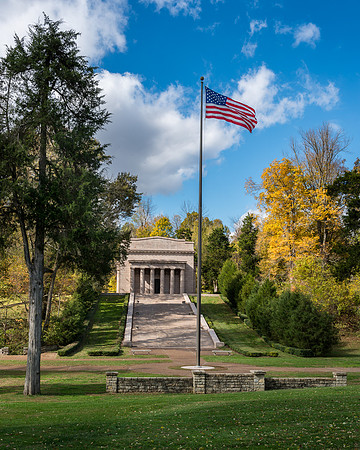
Yet Another Way to Share PhotosI'm always looking for ways to share my photographs. Some tools I use to accomplish this are this website, internet forums, books and holiday cards. Today, I'm trying a new tool--a photo calendar! I decided to create my first photo calendar for 2015 using Lulu. This calendar measures 13.5" wide by 19" high and features 12 (13 if you count the cover) of my favorite images. I ordered one for starters so that I can assess the quality of the product. CLICK HERE to preview and/or purchase of the calendar. A preview of the entire calendar is available for viewing. I've priced the calendar at base cost. In other words, I've elected not to make this a profitable venture. If you are interested in purchasing the calendar, please note that promo codes are usually available for Lulu. The promo codes tend to change over time. I found a 15% discount code rather quickly by performing a Google search. If I like this calendar, I might create additional versions in future years. I'm thinking it would be fun to create a calendar featuring the State Capitols or Places of Worship. The First Lincoln MemorialDuring my last road trip, I visited Hodgenville, Kentucky to visit the birthplace of Abraham Lincoln. It was a very enjoyable visit in large part due to the beautiful autumn weather. In 1911, this first Lincoln Memorial was built on the hill where the Lincoln cabin was located:
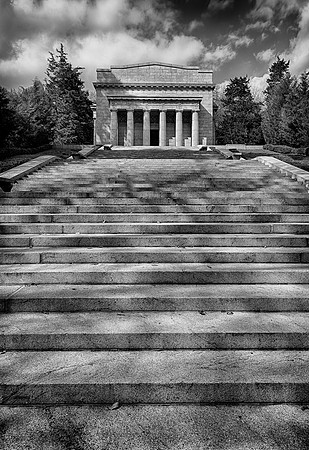
The 56 stairs leading up to the monument represent Lincoln's age at his death:
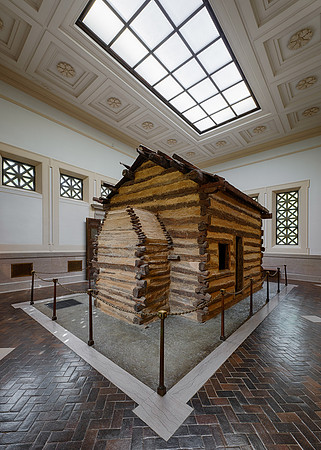
Inside the monument is a log cabin. For years, it was thought that this cabin was the actual Lincoln family cabin. Recently, science took some of the fun out of this notion by proving that the logs are dated shortly after Lincoln's birth:
The interior of the monument features 16 windows, 16 rosettes on the ceiling and 16 fence poles representing Lincoln being the 16th President of the United States. Southeast Capital Cities Preliminary ItineraryBefore the year ends, I plan to continue my quest of visiting capital cities throughout the United States. This upcoming road trip covers 8 State Capitals--bringing my total to 39 capitals. Here's my preliminary itinerary: Day 1: Nashville, TN Day 2: Nashville, TN Day 3: Atlanta, GA Day 4: Montgomery, AL Day 5: Montgomery, AL Day 6: Tallahassee, FL Day 7: Tallahassee, FL Day 8: Charleston, SC Day 9: Charleston, SC Day 10: Columbia, SC Day 11: Columbia, SC Day 12: Raleigh, NC Day 13: Raleigh, NC Day 14: Richmond, VA Day 15: Richmond, VA Day 16: Charlottesville, VA Day 17: Charlottesville, VA Day 18: Charleston, WV Day 19: Charleston, WV Day 20: Orland Park, IL Most of the time, I like to spend a couple of days in the cities. That way, I can visit more local attractions than just the Capitol building. As you can tell by the itinerary, I also plan to visit some "non-Capital" cities--such as Charlottesville, Virginia and Charleston, South Carolina. Hopefully the weather and road conditions will cooperate long enough for me to leave and return to the Chicago area. Winter road conditions are always unpredictable. Pull Out All the Stops to Reduce Camera ShakeWhenever possible, I use a tripod to secure my camera and lens. A major benefit of using a tripod is to minimize camera shake. Minimizing camera shake opens up the possibility of slower shutter speeds--particularly when the subject is not moving quickly. For this image of a green-winged macaw, I secured my Nikon D800 camera and my large Nikon 500VR lens to a Wimberley gimbal head and a Gitzo tripod. This, along with some other techniques which I will describe in a moment, allowed me to acquire a sharp image at the relatively slow shutter speed of 1/30th of a second!
In addition to using a tripod and stable gimbal head, I used the following additional techniques to help keep this image sharp:
Let's say that I didn't concern myself with shutter speed and instead just set the shutter speed at 1/500th (since the rule of thumb is to set the shutter speed for 1 over the focal length of the lens to achieve sharp images). At 1/500th, I would have reduced my exposure by about four stops relative to 1/30th. To get those four stops back, I would need to boost my ISO from 640 to 10,000 to maintain the same exposure! Even with the D800, ISO 10,000 is not a pretty sight! Portrait PhotographyMy subject had no trouble assuming a serious pose--other than that he kept wanting to get too close to my seamless paper background:
Accelerate the ReconstructionWhile planning my Desert Southwest Road Trip, I was looking forward to photographing the Square Tower House in Mesa Verde. When I arrived at the site, I was disappointed to see that the ruins were under construction. For me, the scaffolding is an eyesore:
Using the cloning tool in Photoshop, I was able to remove the scaffolding.
The above image was taken a couple of hours before sunset. My goal was to capture the image with more directional and warmer light. So, I returned to the overlook about 30 minutes before sunset to try again. Fortunately, the light overall was far more directional and definitely warmer. Unfortunately, the sun sets a bit too far north in the summer for the light rays to hit the ruins. The ruins are blocked to the north by a mesa. The warm light was just missing the ruins! The only saving grace is that I had the above image on my sensor from earlier. And, that's the best image that I was going to capture like this during this time of year--particularly once the reconstruction was completed in Photoshop. Fall Colors Preliminary ItineraryOver the past several years, I have traveled by car throughout much of the United States. Yet, I have seen very little of the Southeast. That's changing before this year ends! During mid-October, I'll visit Tennessee and North Carolina to photograph the Fall colors. Here's my preliminary itinerary for this 10 day trip: Day 1- Knoxville, TN Day 2- Boone, NC Day 3- Boone, NC (Blue Ridge Parkway) Day 4- Boone, NC (Blue Ridge Parkway) Day 5- Cherokee, NC (Great Smoky Mountains National Park) Day 6- Cherokee, NC (Great Smoky Mountains National Park) Day 7- Gatlinburg, TN (Great Smoky Mountains National Park) Day 8- Gatlinburg, TN (Great Smoky Mountains National Park) Day 9- Columbus, IN (Various architectural sites) Day 10- Orland Park, IL Hopefully, I'll create enough good pictures to stay busy processing images until my next trip begins. During December, I will tour the Capital Cities of the Southeast for 20 days. Included in this journey are eight Capital Cities: Tennessee, Georgia, Alabama, Florida, South Carolina, North Carolina, Virginia and West Virginia. I will visit Charleston, South Carolina and Charlottesville, Virginia along the way. I'll share that preliminary itinerary as the trip draws nearer. Fall colors come first! Prius Camping...Generation IIII replaced my Generation II Prius with the latest Generation III Prius after my last Prius was totaled while I was parked at a traffic light. I used my last Prius on numerous photo trips with much success. Click here for a description of how the Prius was organized to convert it into a "mini-RV". My hope was that the new Generation III Prius would be similar to my last Prius in this regard. During my most recent photo trip, the Desert Southwest Road Trip, I used the Prius as a camping vehicle for 19 of the trip's 23 nights. I learned that some adjustments were necessary to make the new Prius as comfortable as the previous Prius for camping. When the front and rear seats are folded down, the previous Prius provided a flatter sleeping surface. With the new Prius, I wasn't able to get the sleeping surface flat enough. Although I am using some throw pillows and a 3" thick mattress, there was still a noticeable bump in the area below my back--and this made sleeping very uncomfortable. After a few days on the road, I finally came up with a good solution to this problem. I stopped by a Home Depot and had a piece of 3/4" thick plywood cut to fit the passenger side of the car. The plywood is just over 6 feet long and about 23" wide. It provides a solid base under the mattress. With the plywood in place, the sleeping surface was perfectly flat and very comfortable. Knowing that the Desert Southwest would be very hot in the summer months, I brought my Prius tent along. Surprisingly, most nights were cool enough so that the tent wasn't necessary. But, it came in handy on four or five nights for allowing a nice summer breeze to blow through the cabin. The image below was captured at a campground in Topeka, Kansas:
If you look at the rear side windows of the car, you'll notice a new item that I introduced for this trip--screen windows! Basically, this is some mosquito netting that is stitched into the shape of a big sleeve. With the door open, the netting slides over the window. It's held in place by the closed door and the magnets on the outside of car door. The windows can roll up and down without disturbing the netting.
Unfortunately, the Heatshield window coverings from the my old Prius did not fit the new Prius. So, I ordered replacements. Here's a photo of the new Prius with everything in place--window coverings, screen windows and the tent!
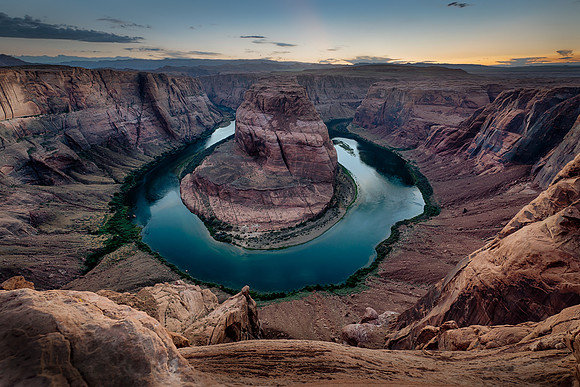
A couple of nights were too hot even for the tent and screen windows to do any good, so I used the cabin temperature control feature available through the Prius--setting the cabin temperature for 77 degrees and letting the Prius maintain that temperature mostly by using the electric motor. So, I'm happy to report that Prius camping lives on through Generation III. Horseshoe BendDuring my last road trip, I visited Horseshoe Bend while I was in Page, Arizona. I've traveled to a lot of places throughout the United States. Horseshoe Bend ranks high on my list of the most scenic locations in the country. One afternoon, I made a scouting trip to the location. I sometimes do this so that I won't be surprised when I arrive in the evening when the light is more favorable. One thing that I learned is that while the overlook is relatively easy to access, it does require a hike of about 3/4 mile is some sandy conditions. It's not located right next to the parking lot. I found it surprising that there wasn't a more structured overlook. Basically, the sandstone outcroppings just end. You must walk right up to the edge of the cliff to see the river. It's a little scary as there are no railings. The distance from the ledge to the Colorado River is about 1,000 feet. It's like being on the observation deck of the John Hancock building without any railings or windows! What makes this even more dangerous is that you can't see how much sandstone is underneath you. If you get too close to certain sections of the edge, you might be standing on sandstone that is just a few inches thick and unable to support your weight. That happened to a tourist a few years ago and he tumbled hundreds of feet to his death. I am absolutely amazed that more people don't die at Horseshoe Bend. While I was there, several kids ran right up to the edge. Some kids sat with their legs hanging over the edge. A few photographers stood within a foot of the edge while looking through the viewfinder. I found it difficult to frame a shot. Without getting too close to the edge, I couldn't include the bottom portion of the river in the frame. In the end, I secured my camera to a tripod. I crawled to a point about three feet from the edge and reached out to place my tripod as close to the edge as possible. From there, I used the Live View on the back of the camera to frame the shot. I used a cable release to trigger the shutter. Although my camera was right on the edge, I was able to stay a reasonable distance away. I was concerned about the possibility of my camera somehow falling over the cliff. It's not as if something like that has never happened to me before! I held onto one of the legs of the tripod so that the camera wouldn't move--especially when the wind gusted. I started shooting about 20 minutes before sunset and continued shooting for about 30 minutes after sunset. The only images that I processed were the very last ones. I find it amazing how today's digital sensors can record such detail and colors despite the fact that the conditions were so dark. In fact, it was so dark when I took this picture that it was challenging finding my way back to the car! This image consists of five exposures blended together to create a high dynamic range (HDR) image. The shutter speed was as slow as 8 seconds to allow enough light through the lens to record the image.
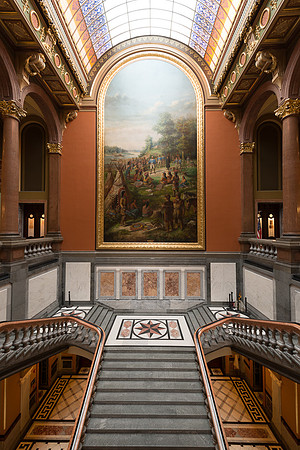
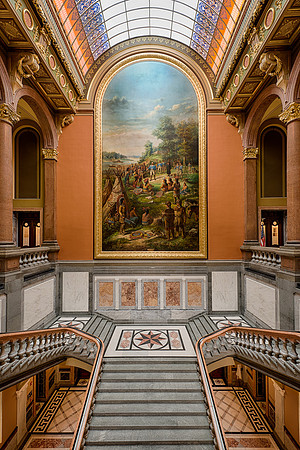
The Mirror TrickSometimes, I use what I refer to as the "Mirror Trick" to clean up a picture. This method came in handy after a recent visit to the Illinois State Capitol in Springfield. The Grand Staircase is an interesting subject. The mural is 20 feet wide and four stories tall! I wanted to capture an image of the staircase and mural. However, as you can see from the original image (straight out of the camera) below, there were some unwanted objects within the frame on the staircase: posts on stands, a pile of rope, etc.
As always, the first thing I tried to address the clutter issue was to physically move the unwanted objects out of the frame. In this case, moving everything was going to take too much effort. The posts were heavy, the pile of rope was cumbersome and all of the items needed to be moved a good distance and then returned to their original place. So, I employed my "mirror trick" instead. I bracketed a few more exposures so that more detail would appear in the highlights and shadows. Next, I used the following approach to remove the unwanted objects:
Here's the completed image with everything cleaned up and put away:
|